
Batchlabels Printen op Schaal: Waarom Drukke Bestelbestdagen Handmatige Verzendprocessen Breken
Batchlabels Printen op Schaal: Waarom Drukke Bestelbestdagen Handmatige Verzendprocessen Breken
Elke magazijnmanager heeft dezelfde middag al meegemaakt. Het bestelvolume schiet omhoog, de labelprinter loopt achter, iemand print een batch opnieuw om bij te blijven, en nu bestaan er twee labels voor hetzelfde pakket op de inpaktafel. Vervoerders weigeren zendingen met dubbele of onleesbare barcodes, omdat hun sorteersystemen afhankelijk zijn van de labelstandaarden die worden vastgesteld door GS1, de wereldwijde organisatie die bepaalt hoe een barcode geprint, geschaald en geplaatst moet worden om in één keer goed te scannen. Een versleten printkop of een wachtrij die stilletjes een opdracht laat vallen, produceert precies het soort label waar GS1's eigen specificaties voor waarschuwen, en op een rustige dag kost die fout een paar minuten. Op een dag met piekvolume kost het de ophaaltijd van de vervoerder.
De volumewiskunde waar niemand een printwachtrij op afstemt
Het pakketvolume binnen de Europese Unie is al meer dan tien jaar gestaag gegroeid, en Eurostats eigen post- en bezorgstatistieken laten zien dat die groei niet gelijkmatig verloopt, ze komt in pieken die samenhangen met promoties, weekdagpatronen en seizoensdrukte. De meeste verzendsoftware is afgestemd op een gemiddelde dag. Dat geldt ook voor de meeste labelprinters, printservers en inpakstations. Precies in het gat tussen het gemiddelde dagvolume en de drukste drie of vier uur van een drukke dag beginnen handmatig opgezette batchprintprocessen te falen, omdat niemand het proces heeft getest voor een ochtend waarin het bestelvolume tussen negen en elf uur verdrievoudigt.
Dit is geen hypothetisch scenario. Een webshop met een flitsactie, een marktplaatsalgoritme dat plots één listing bevoordeelt, of simpelweg de maandag na een lang weekend kan het dagvolume binnen één shift naar twee of drie keer het normale niveau duwen. Magazijnteams die labels een voor een printen, of in kleine handmatige batches vanaf een orderscherm, hebben geen wachtrij die is ontworpen om die piek op te vangen. Ze hebben een wachtrij die helemaal nooit ontworpen is.
Meerdere magazijnen en meerdere pickers die dezelfde orderwachtrij bedienen, maken dezelfde piek op een andere manier erger. Twee pickers die vanaf twee verschillende terminals in dezelfde orderwachtrij werken, kunnen allebei een printopdracht voor dezelfde zending activeren als het systeem een order niet vergrendelt zodra het eerste label wordt aangevraagd, en een tweede magazijn dat overloopbestellingen afhandelt tijdens een piekdag heeft zelden live inzicht in wat het eerste magazijn al heeft geprint. Het resultaat is niet één kapot proces, het zijn twee of drie processen die elk op zichzelf prima lijken te werken en pas een conflict onthullen zodra een vervoerder twee labels scant voor hetzelfde trackingnummer op dezelfde middag.
Waar handmatig batchprinten daadwerkelijk breekt
De printwachtrij loopt stilletjes achter
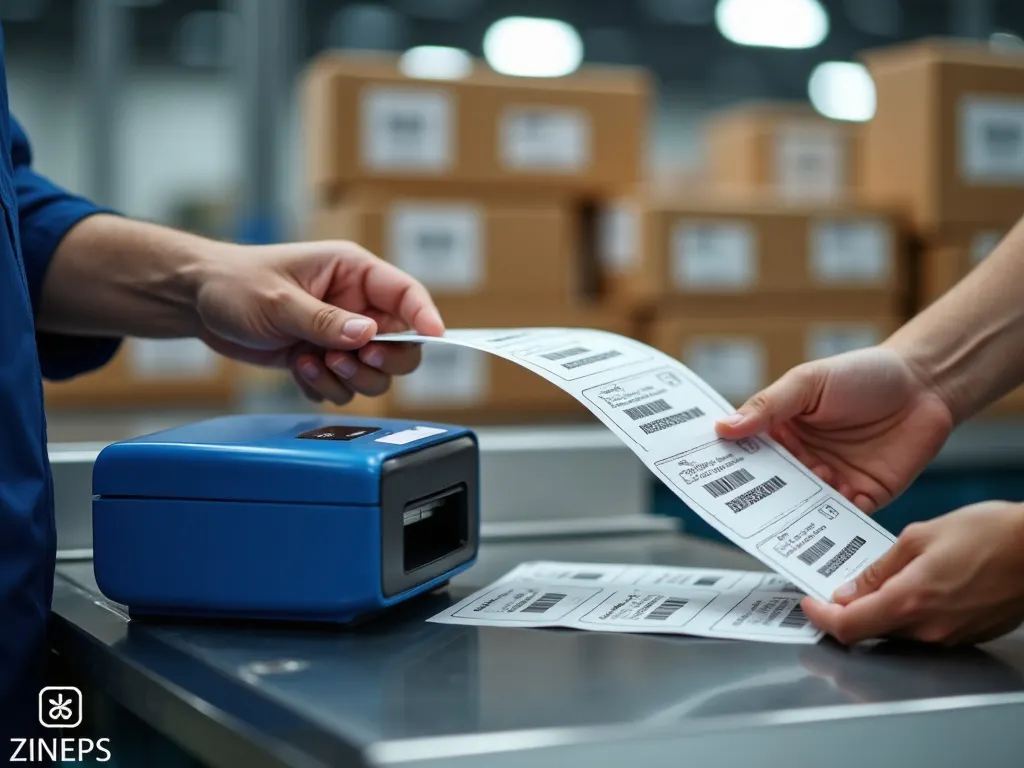
Thermische printers verwerken opdrachten in volgorde van binnenkomst, en de meeste magazijnopstellingen sturen elke order naar dezelfde printserver zonder zicht op hoe diep die wachtrij daadwerkelijk is. Bij een piek groeit de wachtrij sneller dan de printer hem kan wegwerken, en omdat de meeste magazijnsoftware een opdracht toont als verzonden in plaats van als geprint, merkt niemand de achterstand op totdat een picker naar de printer loopt en veertig labels aantreft in plaats van vier. De natuurlijke reactie, de batch voor de zekerheid opnieuw printen vanaf het orderscherm, is precies hoe dubbele labels het magazijn binnenkomen.
Dubbele en ongeldige labels stapelen zich sneller op dan wie dan ook bijhoudt
Elke herdruk creëert een tweede barcode voor dezelfde zending. Als het eerste label al is gescand door een vervoerder, is het tweede een spooklabel dat een valse bezorgscan, een factuurgeschil, of een pakket kan veroorzaken dat dubbel wordt gesorteerd in twee verschillende vrachtwagens. Handmatige processen hebben zelden een harde regel die de oorspronkelijke barcode ongeldig maakt op het moment dat een herdruk plaatsvindt, wat betekent dat de inpakvloer de enige plek is waar een regel wordt gehandhaafd die eigenlijk in de software zou moeten zitten.
Adresvalidatie loopt achter op de printknop
Een verkeerd getypte postcode of een onvolledig huisnummer is goedkoop om te ontdekken voordat een label wordt geprint en duur om te ontdekken erna. De meeste handmatige processen valideren een adres één keer, bij het afrekenen, en daarna nooit meer, waardoor een gewijzigd adres, een samengevoegd dubbel klantprofiel, of een handmatig gecorrigeerde order niet opnieuw wordt gecontroleerd voordat het label wordt aangemaakt. Op een rustige dag merkt een medewerker de afwijking misschien op. Op een drukke dag wordt het label geprint, gaat het pakket op weg, en gebeurt de correctie twee weken later in een klantenserviceticket.
Downtime van de vervoerders-API verandert in een stortvloed aan herdrukken
Elke vervoerder heeft af en toe downtime bij het genereren van labels, en een proces dat rond één vervoerdersintegratie is gebouwd, heeft geen alternatief als dat gebeurt. Orders stapelen zich op in afwachting van een label dat niet kan worden aangemaakt, medewerkers wachten het uit of leiden zendingen handmatig om naar een tweede vervoerder, en tegen de tijd dat de API van de eerste vervoerder weer werkt, printen magazijnteams twee sets labels voor overlappende batches orders terwijl ze proberen te onthouden welke pakketten al zijn verstuurd via de noodvervoerder.
De echte kosten zitten niet in de herdruk, maar in wat er na de sluitingstijd gebeurt
Eén dubbel label kost een picker een paar seconden. Het dure deel is wat een vertraagde of dubbele batch doet met de rest van de dag. Vervoerders hanteren vaste ophaaltijden, en een magazijn dat om vier uur 's middags nog steeds een printachterstand aan het wegwerken is, loopt het risico die deadline volledig te missen, waardoor een hele batch orders in de leverbelofte van de volgende dag terechtkomt zonder dat iemand de klant daarover informeert. Zendingen die een sluitingstijd missen door een printprobleem zien er voor de klant identiek uit aan een zending die simpelweg te laat is, en de klantenservicekosten van het uitleggen van dat gat komen terecht bij een supportteam dat niets met de oorspronkelijke fout te maken had.
Er is een tweede, stillere kostenpost die zelden in een verzendrapport verschijnt. Een klant die een verzendmelding ontvangt, gevolgd door een tweede verzendmelding voor dezelfde order omdat een dubbel label zijn eigen trackingmoment activeert, leest dat niet als een magazijnhapering. Die klant leest het als een bedrijf dat zijn operatie niet onder controle heeft, en die indruk blijft langer hangen dan de daadwerkelijke vertraging zelf.
Vijf signalen dat je labelprintproces één drukke dag verwijderd is van chaos
- Pickers printen regelmatig labels "voor de zekerheid" opnieuw omdat niemand erop vertrouwt dat de eerste print daadwerkelijk bij de printer is aangekomen.
- Je team kan op dit moment niet zeggen hoeveel ongeldige of dubbele labels er vorige maand zijn aangemaakt, omdat niets dat automatisch bijhoudt.
- Eén vervoerdersintegratie verzorgt honderd procent van je labelaanmaak, zonder automatisch alternatief als de API van die vervoerder traag wordt of uitvalt.
- Adrescorrecties die na het afrekenen worden doorgevoerd, triggeren niet automatisch een nieuwe validatie voordat een label wordt geprint.
- Je drukste verzenddag van de maand ziet er qua tijdige overdracht aan de vervoerder totaal anders uit dan een gemiddelde dag, en iedereen verwacht dat inmiddels al gewoon.
Een printstack-audit die je deze week kunt uitvoeren
- Pak je drukste enkele dag uit het afgelopen kwartaal en tel hoeveel labels er zijn aangemaakt versus hoeveel unieke orders er zijn verstuurd, want het verschil tussen die twee getallen is je werkelijke duplicatiepercentage.
- Meet tijdens je drukste uur hoe lang het duurt voordat een label van printopdracht naar de hand van een picker gaat, niet vanaf het plaatsen van de order, want wachtrijdiepte is onzichtbaar totdat je hem direct meet.
- Vraag stap voor stap na wat er vandaag gebeurt als de label-API van je primaire vervoerder dertig minuten uitvalt tijdens een piekmoment, en schrijf elke handmatige stap op die iemand dan zou moeten zetten.
- Controleer of een adres dat na het afrekenen wordt aangepast automatisch opnieuw wordt gevalideerd voordat een label wordt aangemaakt, of dat die correctie alleen gebeurt als een mens het toevallig opmerkt.
Geen van deze controles vereist nieuwe software om één keer uit te voeren. Ze vereisen het ophalen van gegevens die de meeste magazijnen al verspreid hebben liggen over een printserverlog, een vervoerdersdashboard en het geheugen van een picker, en die voor het eerst naast elkaar leggen.
Hoe Zineps dat gat dicht
Dit is precies de laag die wij hebben gebouwd om Zineps op te laten draaien. Als het Operating System for Shipments genereert en volgt Zineps elk label centraal in plaats van batchprinten aan één losstaande oplossing over te laten, zodat een herdruk automatisch het oorspronkelijke label ongeldig maakt in plaats van een spookscan te creëren, en elke labelaanvraag loopt via geautomatiseerde multi-carrier selectie, zodat een trage of offline vervoerders-API direct een alternatief activeert in plaats van een handmatige scramble op de inpaktafel. We schreven eerder al over waarom verzendoperaties in de meeste e-commercebedrijven uiteenvalt in drie losgekoppelde systemen, en over de jaarlijkse reset van vervoerderstariefkaarten die stilletjes marge opeet. Een kwetsbaar batchprintproces is hetzelfde onderliggende probleem, alleen zichtbaar op de magazijnvloer in plaats van op de balans, één systeem dat door niemand is ontworpen voor piekvolume en toch een belofte moet waarmaken die ergens anders in het bedrijf is gedaan.
Magazijnen die batchlabels via één geautomatiseerde verzendlaag laten lopen, meten hun drukste dagen niet langer aan het aantal herdrukte labels, maar op precies dezelfde manier als elke andere dag, aan het aantal orders dat op tijd is verzonden. Die consistentie is, meer dan welke losse functie dan ook, wat een verzendoperatie die meegroeit onderscheidt van een operatie die alleen maar haar eigen groei overleeft.
De conclusie
Handmatig batchlabels printen werkt prima bij laag volume, omdat laag volume fouten vergeeft. Het houdt op te werken precies op het moment dat een bedrijf het het hardst nodig heeft, op de dagen dat het bestelvolume piekt en elke verspilde minuut op de inpaktafel gekoppeld is aan een sluitingstijd van een vervoerder. De oplossing is geen snellere printer of een oplettendere picker, het is een labelaanmaakproces dat daadwerkelijk is gebouwd om het drukste uur van de drukste dag aan te kunnen, met automatische vervoerdersfallback, automatisch ongeldig maken van labels, en adresvalidatie die elke keer draait dat een order wijzigt in plaats van slechts één keer bij het afrekenen. Los die laag op voordat de volgende volumepiek het voor je doet.